Global and Folder Instructions
There is a tax that comes with starting any new task. Before you can get to the actual work, you have to brief whoever is doing it. Here is who I am. Here is the context. Here is how I like things done. If you are working with a new colleague, that briefing makes sense. But if you have worked with someone for months, you stop explaining things from scratch every time. They already know.
Right now, if you start every Cowork task by typing out your preferences — your tone, your role, your naming conventions — you are paying that tax again and again. Cowork has two features designed to eliminate it: global instructions and folder instructions. Together, they let you give Claude the standing brief once, and then never repeat it.
The Difference Between the Two
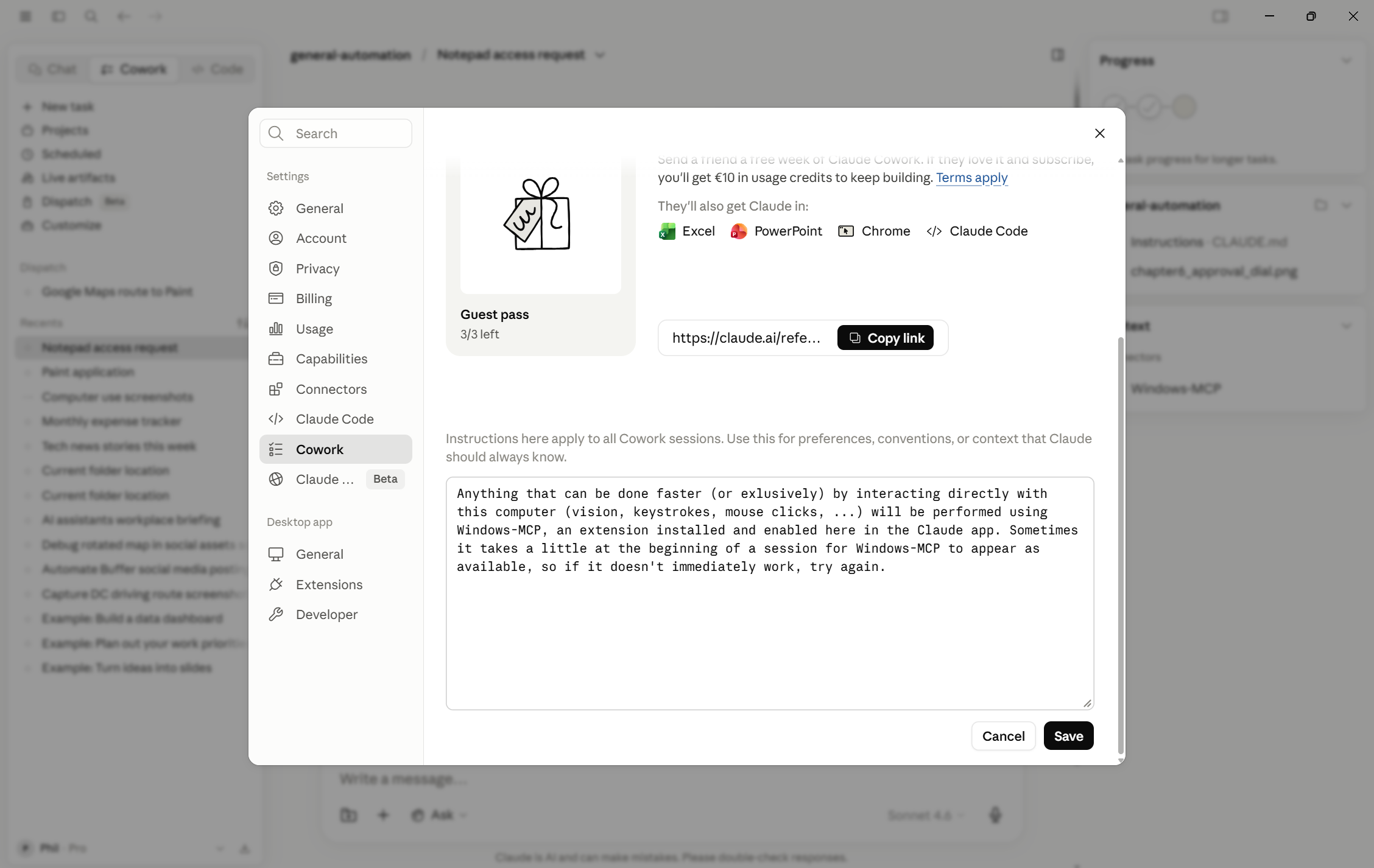
Global instructions are exactly what they sound like. You write them once, in your Cowork settings, and they apply to every task you ever run. Any session, any folder, any kind of work. If there is something true about you and how you work that you want Claude to know regardless of what you are doing, it goes here.
Folder instructions are attached to a specific connected folder. When Claude starts a task that involves that folder, it reads the folder instructions first. They are not about you in general — they are about this project, this client, this context. The brief a new hire would need before touching those files.
Think of it this way: global instructions are your permanent profile. Folder instructions are the project handoff document. Both exist so that you stop re-explaining things you have already explained.
What Goes in Global Instructions
Start with who you are and what you do. Not a formal bio — just the professional context that shapes what good output looks like for you. A legal ops manager at a mid-size tech company has different needs than a freelance copywriter or an operations lead at a logistics firm. Claude does not know which one you are unless you say so. Once you do, it can calibrate everything accordingly.
Then add the preferences you repeat most often. Consider tone first: do you want writing that is direct and plain, or more formal, or conversational? If you have caught yourself typing "please make this less corporate" across multiple tasks, that note belongs in global instructions. Something like "My preferred writing tone is direct and professional. Avoid flowery language or corporate buzzwords" sets the standard once.
Format preferences belong here too. If you always want documents saved with a date prefix in the filename — formatted YYYY-MM-DD — write that in. If you prefer bullet points over numbered lists, or short paragraphs over long ones, say it. Every habitual correction you make is a standing instruction waiting to be written down.
You can also include background facts that make Claude more useful. What industry you are in. What tools your team uses. Whether you work in British or American English. The timezone you operate in. These are not dramatic details, but they are the kind of thing a good colleague knows after a few weeks of working with you, and they quietly improve the quality of every task.
What Goes in Folder Instructions
Every project folder you connect to Cowork can have its own set of instructions. You set these when you connect a folder or manage it afterward in your Cowork settings. When Claude begins any task involving that folder, it reads these instructions before doing anything else.
The most important thing to put here is the context someone would need to not make an embarrassing mistake. If the folder contains all the materials for a specific client account, say who that client is and how to refer to them. If you are working on the Henderson account — a logistics company — you might write: "This folder contains all materials for the Henderson account. The client is a logistics company. Always refer to them as Henderson, not by the full legal company name." A small thing, but the kind of small thing that matters when you are producing documents that will be seen by the client.
Structure and naming conventions also belong here. If reports in a given folder always follow a fixed template — Executive Summary, then Findings, then Recommendations — put that in the folder instructions. Do not leave Claude to guess what structure you want. The same goes for file naming: if spreadsheets in a project folder should be named in the format Project-Type-Date, write it down. Conventions exist to keep things consistent, and folder instructions are how you make sure Claude respects them.
You can also use folder instructions to flag what the files in a folder actually contain, especially if the names alone are not obvious. "Files in this folder are rough transcripts from client interviews. They are informal and unedited. Do not quote them directly in any output — summarize instead." That kind of note prevents the kind of mistake that only happens once but is hard to recover from.
Before and After
Here is what it looks like without standing instructions. You open a new task. Before you describe what you want done, you type two or three sentences of context: who you are, what tone you want, what the naming convention is for this project. You do this because you have learned that skipping it produces output that needs to be corrected. It takes a minute each time. Over a week of tasks, it adds up, and the occasional missed context means fixing things you should not have to fix.
Now imagine the same task with standing instructions in place. You open a new task and describe exactly what you want done. No preamble. Claude already knows you are a legal ops manager who wants plain English. It already knows the Henderson folder uses a specific report structure and refers to the client by a short name. The task starts with everything it needs. The output comes back already calibrated.
The difference sounds small, but over time it changes how you relate to Cowork. You stop thinking of it as a tool that needs managing and start thinking of it as someone who already knows the drill. That is when delegation stops feeling like extra work.
The Signal to Watch For
The clearest signal that something should become a standing instruction is repetition. Every time you find yourself typing the same phrase across multiple tasks — the same tone note, the same context, the same format preference — that phrase is a standing instruction that has not been written down yet. Start with what you repeat most often, and add to it as you notice the patterns.
Both global and folder instructions are set in plain language — no special format required. Write them the way you would explain them to a person. You will find global instructions in your Cowork settings, and folder instructions when you connect or manage a folder.
One small technical detail worth knowing: folder instructions are stored as a file called CLAUDE.md in the connected folder itself. If you ever open that folder in a file browser and spot a file with the .md extension, that is the instruction file — you can open and edit it in any text editor. Plain sentences work perfectly.
Open your Cowork settings and write your first set of global instructions. Do not aim for perfection — aim for usefulness. Start with three things: a sentence describing who you are professionally, a note about your preferred writing tone, and one practical preference you have repeated across past tasks (a file naming habit, a format you always want, a style correction you keep making). Write them in plain sentences, as if you were briefing a new colleague on their first day.
Save them, then run a task you would normally do and see whether the output reflects them. If it does not quite match, adjust the wording. Standing instructions improve through use, not through planning.