The Web as a Source
Most people, when they first start using Cowork, think of it as a tool for working with files. You connect a folder, point Claude at your documents, and it does something with them. That's true — and it's covered in the previous chapter.
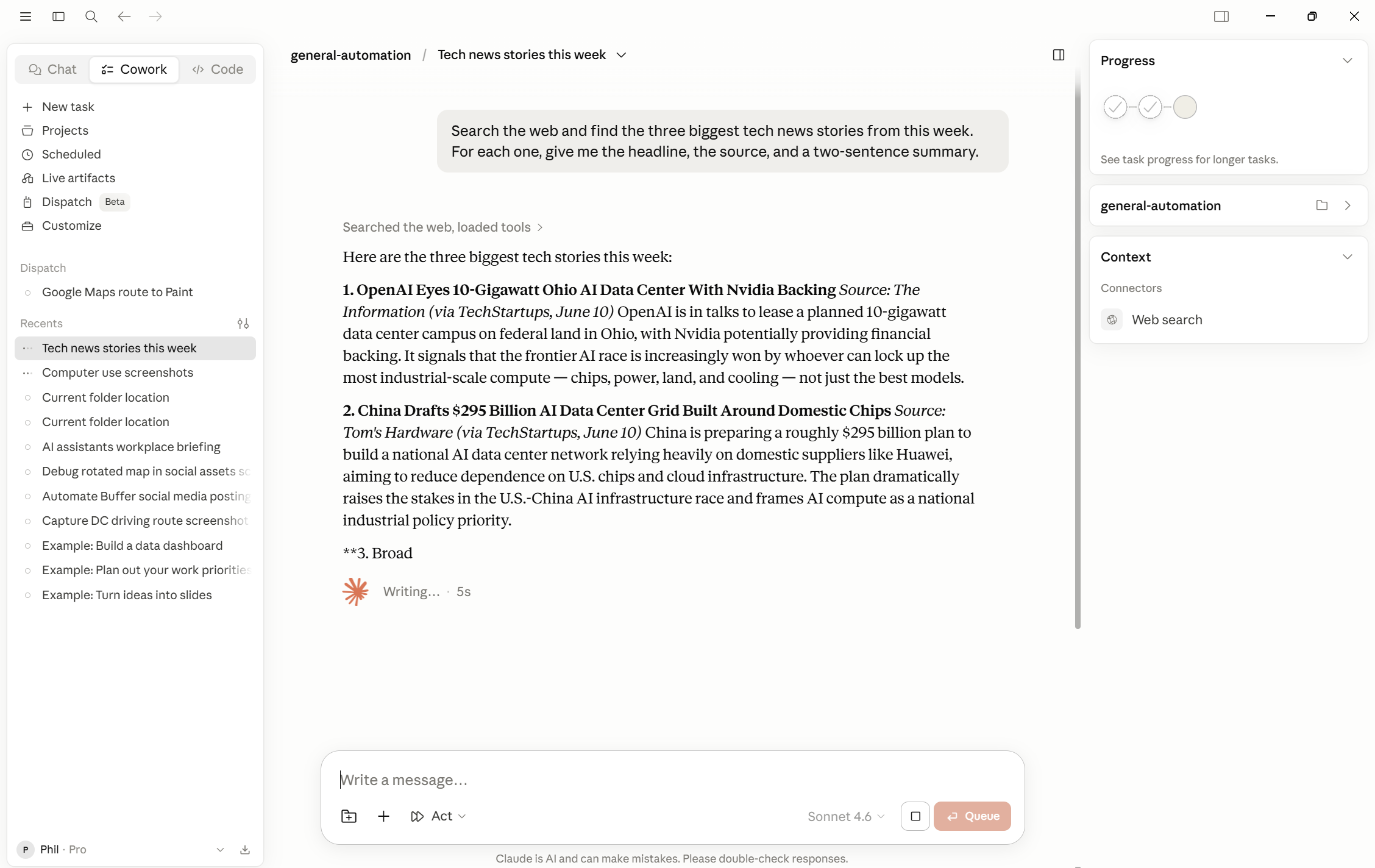
What's easy to miss is that your files don't have to be the only source. Claude can go and get information from the web, right now, without any setup, as part of any task you give it.
No extension to install. No connector to configure. No separate step where you paste in an article and say "here, use this." You just describe what you need, mention that it should check the web, and Claude does it.
This Is Already Built In
When most people think about AI and the web, they picture a chatbot that's been "updated" with recent data, or an extension that summarizes pages in their browser. That's not what this is.
In Cowork, web research is simply part of how Claude works on a task. If you ask for a competitive analysis of three companies, Claude can look up their latest announcements while it writes. If you ask for a summary of a regulatory update, Claude can go find the update first. If you're producing a report and one section needs a figure you don't have on hand, Claude can go check it.
This works the same way it would if you had asked a research-savvy colleague to handle something: they'd open a few tabs while they worked, not stop and wait for you to paste things in.
What This Looks Like in Practice
Here are two situations that come up all the time in office work.
The first: you're preparing a briefing for a client meeting and you want a quick picture of what's been happening in their industry over the last few weeks. You have some background notes in your folder — previous meetings, internal context — but nothing current. The prompt looks something like this:
"Draft a two-page briefing for our meeting with [Client]. Use the background file
in my folder for context on our relationship and previous discussions. For current
news, check what's been published about [their industry] in the past month and
include anything relevant."
Claude reads your file and searches the web. The briefing comes out combining what you already knew with what's happening now. You didn't have to find the articles yourself, paste them in, or run two separate steps.
The second: you're working on a financial model or a proposal with a figure that needs to be current — an exchange rate, a market price, a competitor's announced headcount. Rather than opening a browser yourself, looking it up, and then coming back:
"Update the assumptions tab in the Budget Q3 spreadsheet. Use the current EUR/USD
rate and check [Competitor]'s latest public headcount figure — I think they
announced something in the last earnings call."
Claude checks, finds the figures, and updates the file. The result is accurate as of right now, not as of whenever you last touched the spreadsheet.
Combining Web and Your Files
The most useful version of this isn't "look something up" or "use my files" — it's both in the same task.
Ask Claude to compare your internal quarterly numbers against publicly reported industry benchmarks. Ask it to review your draft contract clause against the current text of the regulation it references. Ask it to pull together a market overview from recent news and your own research notes into a single document.
The source material for any task can be files you have, things Claude finds on the web, or both. You don't have to decide in advance — just describe what you want the output to look like, and Claude figures out what it needs to go get.
A Note on Accuracy
What Claude finds on the web is subject to the same scrutiny as anything it produces: read it, check it, don't deliver it as fact without verifying anything important. Web search is not infallible — sources can be wrong, out of date, or simply not what you meant. For anything that will go to a client or inform a decision, it's worth glancing at the sources Claude used.
Note: this chapter is about Claude looking things up — not about Claude operating inside websites or web apps on your behalf, which is a separate capability covered later in the guide.
Pick a task from your current work that normally requires pulling in outside information — something recent you'd usually look up yourself. Maybe it's a background brief on a company, a check on a market figure, or a summary of recent news in a sector you follow.
Write the delegation prompt the same way you would for a file-based task, but add one line that points Claude at the web:
"For current information on [topic], check recent sources — I don't have this in my folder."
Run the task. Pay attention to what Claude finds and how it integrates that information with anything else it's working from. Then check one of its sources directly. This isn't about distrust — it's just useful to know what the output is built on.