Professional Outputs
There's a specific kind of frustration that comes from using an AI chat tool for work: you describe the report you need, you get a well-organized text response, and then you spend the next hour turning that text into an actual document — formatting it, putting it into a template, building the table you asked for by hand. The AI helped. You still did the job.
Cowork produces the file.
Not a draft to copy somewhere. Not a table to paste into Excel. A real, finished, properly formatted file — saved directly to your folder, ready to open, ready to send.
What "Real Output" Actually Means
The difference is more significant than it sounds.
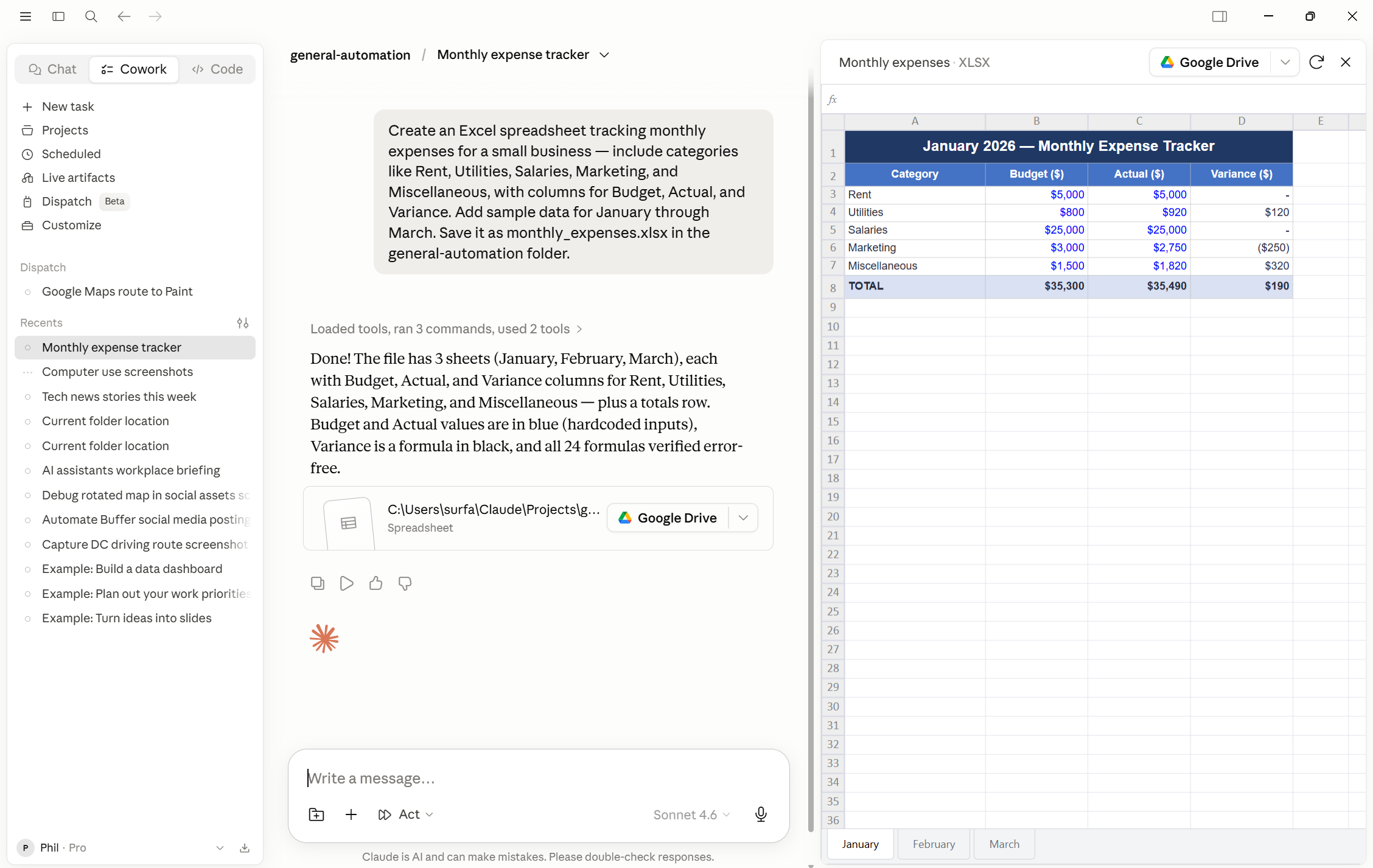
When you ask Cowork for a spreadsheet, you get an Excel file. Not a table in the chat, not a CSV that opens as a flat grid — an .xlsx file with the data organized the way you asked for it, formulas that actually calculate, and multiple tabs if the task calls for them. You open it in Excel and it works.
When you ask for a presentation, you get a PowerPoint file. Actual slides, in the right structure, with the content Claude drafted from whatever source material you provided. You can open it, edit it, and present from it.
When you ask for a document, you get a Word file with real formatting: headings, sections, page structure. Not plain text you'd need to style yourself. When you ask for a PDF, you get a PDF — ready to attach to an email.
The format matches what the work actually requires. You don't need to do the assembly.
Two Examples
Here's what this looks like in practice, with the kinds of work tasks it applies to most directly.
A finance analyst has a folder of transaction exports from three different systems — one per business unit. She asks Cowork to consolidate them into a reconciliation spreadsheet: one tab per source, a summary tab with totals by category, and a variance column comparing actuals to the budget figures in a separate file she's connected. What comes back is an Excel workbook that's genuinely ready for review. The formulas link across tabs. The variance column is calculated. The only thing left is her judgment on what the numbers mean.
A team lead at a consulting firm has a folder of rough notes from four client workshops — bullet points, half-finished sentences, things jotted down in a hurry. He asks Cowork to turn them into a debrief presentation: one section per workshop, key findings, patterns across sessions, and a final slide with recommended next steps. What comes back is a PowerPoint file with the workshops structured as separate sections, the key findings written in full sentences, and a recommendations slide synthesized from across all four sets of notes. He glances at it and the structure is right, but the recommendations slide is too vague — it lists observations instead of actual next steps. He replies with one line: "The recommendations slide should be specific actions with an owner and a deadline, not general observations." Cowork revises just that slide. The whole thing — first pass plus the correction — took under ten minutes.
The common thread: the output is already in the format the work requires. The review and judgment are his; the assembly was not.
You Don't Need to Specify the Internals
You don't need to know anything about how Excel organizes sheets, or how PowerPoint structures a file. You describe what you want the result to look like — the sections, the data, the structure — and Claude figures out how to build it.
"A spreadsheet with one tab per region and a summary tab" is enough. "A slide for each of the three proposals, with a pros and cons section on each" is enough. If you want something specific about the formatting — a particular column order, a cover slide with certain information — say so. But if you don't have a preference, Claude makes sensible choices and you can adjust from there.
The more clearly you describe the output — what it should contain, who it's for, what decisions it should help with — the closer the first version is to what you actually need.
Find a task where you'd normally hand-build the output yourself: a summary that should be a Word document, a comparison that should be a spreadsheet, a set of notes that should be slides.
Ask Cowork to produce it. Write the prompt around the output — what it should contain, how it should be structured, where to save it. Don't describe the steps; describe the result.
Open what you get back in the native application. Check whether the formatting held, the formulas work, the structure makes sense. The goal here isn't a perfect first draft — it's to see that the file comes out as a real, usable file, not text in a chat window.