Prompting for Delegation
There is a skill gap most people hit the first time they try to delegate a real task to Claude. They write a prompt, get back something that misses the mark, and conclude one of two things: either Claude isn't capable enough, or they didn't explain themselves well enough, so they rewrite the whole thing from scratch and try again.
Neither conclusion is quite right. The gap is almost always a prompting gap — specifically, the gap between chat prompting and delegation prompting. They look similar on the surface, but they require a different mindset.
Chat prompting is conversational. You ask, you get a response, you react, you continue. The back-and-forth is the medium. Delegation prompting is more like writing a good brief: you describe what done looks like, give Claude what it needs to work with, and let it do the job. The goal is to write a prompt that could be handed to a highly capable person — a smart intern, a capable contractor — and executed without a single follow-up question.
That single-question test is actually the best calibration tool you have. Read your prompt back and ask: if someone I trusted received this, what would they have to guess? Whatever they'd have to guess is what your prompt is missing.
The Four Ingredients
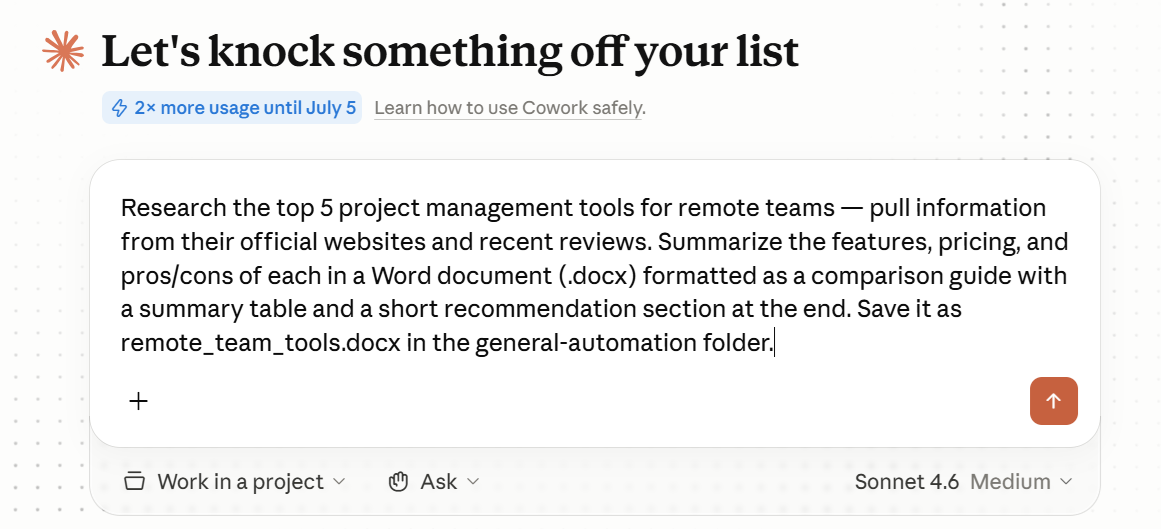
Strong delegation prompts have four ingredients. Not as a checklist to follow mechanically, but as a way of thinking about what you're actually communicating.
The first is the outcome. What does finished look like? This is different from describing what you want Claude to do. "Summarize the reports" describes an action. "Produce a single-page executive summary that a non-technical director could read in two minutes and come away understanding our Q2 performance against targets" describes an outcome. The difference matters. When you specify the outcome, you give Claude the ability to make judgment calls on the how. When you only specify the action, you leave the purpose ambiguous.
The second is the source material. Where should Claude look? If you are asking Claude to work with files, name them explicitly. "Use the survey responses in my /Research folder" is far more useful than "use the data I mentioned." Claude is not guessing from context about which files you mean, what they contain, or which ones take precedence if there are multiple versions. Being explicit here is not pedantic — it is the difference between getting what you expected and getting something Claude invented to fill a gap.
The third is the output format and destination. What file type, and where should it go? This seems obvious, but it is one of the most commonly skipped ingredients. "Save as a .xlsx file to my /Finance/Q2 folder" gives Claude a clear landing zone. Without it, you may get output in the wrong format, pasted into the conversation instead of saved somewhere, or saved in a location that makes sense to Claude but not to you.
The fourth is constraints and preferences. This is the catch-all for anything that shapes how the output should feel, who it is for, or what it should avoid. Tone, length, structure, audience, things to exclude. Not everything needs a constraint, but when you have a strong preference — the report needs to match our house style, the analysis is for a client who doesn't know our internal terminology — say so here. Constraints are not limitations on Claude; they are information that helps it deliver exactly what you need.
Before and After
Here is what the gap between a weak prompt and a strong one looks like in practice.
Imagine you are a marketing manager preparing a competitive briefing before a product launch. You have collected recent articles, analyst notes, and a competitor comparison spreadsheet. You need a document your product team can read before a Thursday meeting.
The weak prompt:
"Can you put together a competitive briefing based on the research I have?"
This is a reasonable-sounding request. It is also almost entirely ambiguous. What research? What format should the briefing take? How long? Who is reading it? What decisions does it need to support? A capable person receiving this prompt would have to ask at least four follow-up questions before starting. Claude will fill those gaps with assumptions — and the assumptions may not match what you had in mind.
The strong prompt:
"Using the files in my /Marketing/Competitive folder — including the three news articles,
the analyst note from May, and the competitor comparison spreadsheet — write a competitive
briefing for our product team ahead of Thursday's launch review. The briefing should be
two to three pages. Structure it with a one-paragraph situation summary at the top, then
a section on each of our three main competitors covering their recent moves and pricing
positioning. Close with a section called 'Implications for Launch' that pulls out the
two or three things our team most needs to account for. The audience is our product leads,
who know our product well but may not have followed competitor news closely. Save as a
.docx file to /Marketing/Briefs."
Same task. Completely different brief. The second version specifies the outcome, names the source material, gives structure guidance without dictating every sentence, identifies the audience, and provides a destination. A smart intern could execute it without asking anything.
The Over-Specification Trap
There is an opposite failure mode worth naming, because intelligent, detail-oriented people fall into it often. Over-specification: writing a prompt that is essentially an instruction manual.
It looks like this:
"First, open the competitor comparison spreadsheet. Look at columns B through F.
For each competitor, note the price in column C. Then look at the articles in the
folder. Find any mentions of pricing. Cross-reference those mentions with the
spreadsheet. Then write a paragraph about each competitor. Start with their name.
Then describe their pricing. Then describe any recent news. Use three sentences per
competitor..."
This is worse, not better, than a clean outcome description. When you specify every step, you override Claude's judgment about the most effective approach. You also make the prompt brittle — if the spreadsheet has a different structure than you expected, or if the articles don't mention pricing explicitly, the step-by-step instructions break down. A good outcome description gives Claude latitude to handle variation intelligently. A step-by-step script doesn't.
The right level of specificity is: enough that done is unambiguous, not so much that you are micromanaging the method.
Iterating Without Starting Over
The first output is often close but not quite right. The instinct most people have is to rewrite the whole prompt and try again. That instinct is almost always wrong.
When you rewrite from scratch, you discard everything Claude learned from your first prompt and its own output. You also make it harder to isolate what actually needed to change. The better move is to treat the output as a draft and give feedback on it directly.
Consider the difference between these two responses to an output that didn't quite land:
Option one — starting over:
"Let me try again. I need a competitive briefing that is more concise and focused
on pricing strategy. The audience is our product leads. Please use the files in
the /Marketing/Competitive folder..."

Option two — iterating on the output:
"The structure is right and the competitor sections work well. The executive summary
is too long — cut it to three sentences maximum. The 'Implications for Launch'
section should be more specific; right now it's too general to be actionable.
Can you revise just those two sections?"
Option two is faster and more effective. You are giving Claude precise, targeted feedback on what exists, rather than asking it to reconstruct the task from new instructions. This is the same approach you would use with any collaborator: you don't hand a draft back and say "start over with better judgment." You mark what needs to change and why.
The exception is when the output reveals that your original prompt was fundamentally misleading. If Claude solved the wrong problem entirely, a revised prompt makes sense. But if the output is directionally right and needs refinement, iterate on it. You will get to the final version faster.
The Intern Test in Action
Take any prompt you have written or are about to write. Read it as if you are a smart, capable person who has just received it as a work assignment. You know the tools. You are willing to work hard. But you have never met the person who wrote the brief, and you have no context beyond what is on the page.
What would you have to guess?
If the answer is nothing — you have a clear output in mind, you know where the source material lives, you know what format to deliver, and you understand the constraints — the prompt will work. If the answer is one or two things, those are the gaps to fill. If the answer is four or five things, the prompt needs a substantial revision before you send it.
This is not about following a template. It is about developing a sense for what a prompt is actually communicating versus what you assume it communicates because you already know the context. That gap between what you know and what you have written is where most delegation failures live.
A useful habit: write the prompt, then put yourself in the reader's position for thirty seconds before sending. That pause alone will catch most of the gaps.
Think of one real task you do regularly that involves pulling together information from multiple sources — a weekly status report, a meeting summary, a project update, a research compilation. Something you have done at least a few times and know well.
Write a delegation prompt for it using the four ingredients: outcome, source material, output format and destination, and any constraints or preferences. Then apply the intern test: read your prompt as if you had no prior context and identify anything you would have to guess. Revise the prompt to close those gaps. Your goal is a prompt where the answer to "what would I have to guess?" is genuinely nothing.
Once you have it, run the task. When the output comes back, resist the urge to evaluate it as pass or fail. Instead, identify the two or three most specific things that would make it better, and write that feedback directly to Claude as a follow-up. Notice how much faster the second version gets to done.